Visit BlogAdda.com to discover Indian blogs Visit blogadda.com to discover Indian blogs | Training Institute in Pune

Thursday, 13 July 2023

What Is Mount Point In Linux

 Introduction

In the Linux ecosystem, mount points serve as vital components for managing and accessing file systems. These directories play a crucial role in integrating storage devices and enabling efficient data handling on Linux systems. In this blog post, we will delve into the concept of mount points, explore their functionality, and highlight their significance in the Linux environment.

What Exactly is a Mount Point?

In Linux, a mount point refers to a directory within the file system hierarchy that acts as a gateway or access point for a storage device or file system. When a storage device, such as a USB drive or hard disk, is mounted, it becomes accessible through a designated mount point. Mount points facilitate the seamless integration of additional file systems, allowing users and the operating system to interact with the data stored within.

Understanding the Mounting Process:

Mounting is the procedure of associating a file system with a mount point, thereby enabling access to its contents. By mounting a file system, the directory structure within it becomes available for reading, writing, and managing files. This crucial step ensures the utilization of storage devices and their smooth integration into the Linux file system.

Creating Mount Points:

To create a mount point, an empty directory within the existing file system hierarchy needs to be designated. Commonly, directories such as /mnt or /media are utilized for this purpose, although any suitable empty directory can serve as a mount point. The mkdir command can be employed to create a new directory to function as the mount point. For instance, executing sudo mkdir /mnt/mydrive will create a mount point called "mydrive" within the /mnt directory.

Mounting File Systems:

Once a mount point is established, a file system can be mounted onto it using the mount command. This command necessitates the specification of both the file system or device to mount and the designated mount point directory. For example, executing sudo mount /dev/sdb1 /mnt/mydrive will mount the file system located on the /dev/sdb1 device onto the /mnt/mydrive mount point.

Automatic Mounting at Boot:

To ensure the automatic mounting of a file system during system boot, the /etc/fstab file must be configured accordingly. This file contains a list of file systems to be mounted upon startup. By adding an entry for a particular file system, users can define the corresponding device, mount point, file system type, and mount options.

Unmounting File Systems:

Unmounting a file system involves detaching it from the mount point, rendering it inaccessible. This process can be accomplished using the umount command followed by the specific mount point. For instance, executing sudo umount /mnt/mydrive will unmount the file system associated with the /mnt/mydrive mount point.

Conclusion:

Mount points play an integral role in the Linux ecosystem, enabling seamless integration and efficient management of storage devices and file systems. By grasping the fundamentals of mount points and utilizing them effectively, users can effortlessly access and leverage data stored on various storage devices within a Linux environment. Understanding the mounting and unmounting processes, creating appropriate mount points, and configuring automatic mounting ensure streamlined access and utilization of storage resources on Linux systems.

To Know More About What Is Mount Point In Linux Click Here 


Tuesday, 20 June 2023

How To Improve Personal Development Skills

Improving personal development skills is a lifelong journey that involves continuous self-reflection, learning, and growth. It is a process of investing in oneself to enhance various aspects of life, including professional success, personal well-being, and relationships. In this blog, we will explore practical strategies and tips to improve personal development skills, empowering you to reach your full potential.

  1. Set Clear Goals: Start by setting clear and specific goals that align with your aspirations. Identify what areas of personal development you want to focus on, whether it's improving communication skills, time management, or leadership abilities. Setting goals provides a sense of direction and helps you stay focused on your desired outcomes.

  2. Seek Knowledge and Learn Continuously: Commit yourself to lifelong learning. Read books, attend seminars, take online courses, and listen to podcasts to expand your knowledge and gain new perspectives. Learning keeps your mind engaged, enhances your skills, and exposes you to fresh ideas and opportunities.

  3. Develop a Growth Mindset: Cultivate a growth mindset, which is the belief that your abilities and intelligence can be developed through effort and learning. Embrace challenges, see failures as opportunities for growth, and maintain a positive attitude. A growth mindset fosters resilience, adaptability, and a willingness to learn from setbacks.

  4. Practice Self-Reflection: Regularly take time to reflect on your experiences, actions, and beliefs. Self-reflection promotes self-awareness and helps you identify strengths, weaknesses, and areas for improvement. Ask yourself thought-provoking questions and journal your thoughts to gain insights into your personal development journey.

  5. Seek Feedback: Actively seek feedback from mentors, colleagues, friends, and family members. Feedback provides valuable insights into your blind spots and areas for improvement. Be open to constructive criticism and use it as an opportunity to grow and develop.

  6. Embrace Challenges and Step Out of Your Comfort Zone: Growth occurs outside of your comfort zone. Take on new challenges, whether it's volunteering for a new project at work or learning a new skill. Embracing challenges helps you develop resilience, adaptability, and confidence in your abilities.

  7. Develop Effective Communication Skills: Communication is a fundamental skill in personal and professional relationships. Enhance your communication skills by actively listening, expressing yourself clearly, and practicing empathy. Effective communication fosters understanding, collaboration, and healthy relationships.

  8. Prioritize Self-Care: Personal development goes hand in hand with self-care. Take care of your physical, mental, and emotional well-being. Prioritize activities that recharge and rejuvenate you, such as exercise, meditation, hobbies, and spending quality time with loved ones. When you take care of yourself, you have the energy and mental clarity to focus on personal growth.

  9. Build a Support Network: Surround yourself with like-minded individuals who support your personal development journey. Seek out mentors, join professional networks, and engage in communities where you can learn from others and receive encouragement and support.

  10. Practice Gratitude and Mindfulness: Cultivate a practice of gratitude and mindfulness in your daily life. Take time to appreciate the present moment, express gratitude for the blessings in your life, and develop a positive mindset. Mindfulness and gratitude enhance self-awareness, reduce stress, and promote overall well-being.

Remember, personal development is not a one-size-fits-all approach. Embrace your unique journey and tailor your efforts to your specific goals and aspirations. Be patient with yourself, as personal development is a continuous process that takes time and dedication. By implementing these strategies and nurturing a growth mindset, you can enhance your personal development skills and unlock your full potential.


Saturday, 25 March 2023

What Is VPC In AWS?

AWS VPC Stands for Virtual Private Cloud. It is a virtual network service provided by AWS that enables users to launch their resources in a logically isolated section of the AWS cloud. It allows you to create a private network within the AWS cloud, which gives you complete control over the virtual networking environment, including the IP address range, subnets, route tables, and network gateways.


Components Of VPC In AWS :

Here is the list of Components Of VPC In AWS
  • Subnet

  • Route Table

  • Elastic IP 

  • Elastic Network Interface(ENI)

  • Internet Gateway

  • Customer Gateway

  • VPN Connection

  • Virtual Private Gateway

  • VPC Peering

  • VPC Endpoints

  • NAT Gateway


Let’s understand one by one in detail the Components Of VPC In AWS - 


  1. Subnet

  • A subnet is a range of IP addresses in the VPC.

  • The Subnet Is the Core Component Of VPC


  1. Route Table

  • The Route Table will decide where the network traffic will be directed 


  1. Elastic IP 

  • An Elastic IP address is a static, public IPv4 address designed for dynamic cloud computing. 

  • You can associate an Elastic IP address with any instance or network interface in any VPC in your account.


  1. Elastic Network Interface(ENI)

  • It is a logical networking component in a VPC.

  • ENIs are virtual network cards you can attach to your EC2 instances.


  1. Internet Gateway

  • An Internet gateway is a VPC component that allows communication between instances in your VPC and the Internet.

  1. Customer Gateway

  • A customer gateway is a resource that is installed on the customer side and is often linked to the provider side.

  • It provides a customer gateway inside a VPC. 


  1. VPN Connection

  • A VPN (or Virtual Private Network) establishes a secure connection between multiple networks i.e. on-premise network, client space, AWS Cloud, & all the network acts

  • VPN Provides a high-available, elastic, and managed solution to protect your network traffic.

  1. Virtual Private Gateway

  • A virtual private gateway is a logical, fully redundant, distributed edge routing function that sits at the edge of your VPC


  1. VPC Peering

  • VPC peering establishes a connection between two VPCs.


  1. VPC Endpoints

  • It allows you to create a connection between your VPC and supported AWS services.

  • The VPC Endpoints are powered by PrivateLink.

  • EndPoints will not require Internet GateWay, Virtual Private Gateway, or NAT Components.


  1. NAT Gateway 

NAT Gateway is a highly available AWS-managed service that makes it easy to connect to the Internet from instances within a private subnet in a VPC.

How VPC Works In AWS?


  • When users create a VPC, they define an IP address range for the VPC, which is divided into subnets.

  • Each subnet is associated with an availability zone (AZ) in the region where the VPC is created. This ensures that resources launched in different subnets are placed in different AZs, providing fault tolerance and high availability.

  • Users can launch EC2 instances, RDS instances, and other resources within each subnet. These resources are assigned private IP addresses from the IP address range of the VPC.

  • Users can also create network access control lists (ACLs) and security groups to control inbound and outbound traffic to the resources in the VPC. This allows users to restrict access to their resources to authorized users and applications.

  • Users can also create VPN connections to connect their on-premises network to the VPC, allowing them to extend their private network to the cloud.

  • Additionally, users can create network gateways such as an Internet Gateway or Virtual Private Gateway to provide connectivity between the VPC and the internet or other VPCs.


VPC is important in AWS as it enables secure and isolated environments for launching resources with customizable network topology and security measures, enhancing security and connectivity.


Interesting To Know More About VPC Click Here For More Details.

Thursday, 23 March 2023

How Do I Learn AWS Cloud Computing In 2 Months

 Learning AWS cloud computing in 2 months is an ambitious goal, but it is possible with a dedicated effort and a structured approach. 


AWS is a vast field, and it cannot be learned completely in just 8 hours. According to me If you have a full-time job and other commitments, it may take around 80 hours or two months to learn AWS. However, if you are entirely new to AWS, you may need around 120 hours or three months to prepare.


To get started with AWS, start with the basics and then progress to the Solutions Architect - Associate Learning Path. The time it takes to learn AWS may depend on your previous experience with it, as well as your efforts and hardwork.


Here's a to-do list for learning AWS Cloud Computing:


  • Define your learning goals: Decide on what you want to learn, such as AWS services, cloud architecture, security, or cost optimization.


  • Choose the right resources: Look for online/ Classroom courses to learn AWS Cloud Computing.


Technogeeks is the best place to learn AWS Cloud Computing.The curriculum at Technogeeks is designed to help students complete their AWS Training certification, and it will also help to crack the international exam AWS Solutions Architect. At the same time, the purpose of the AWS training course is to help prepare for real-world challenges in an ever-changing IT landscape.


  • Set up an AWS account: Create an AWS account to access the AWS console, services, and tools.


  • Learn the basics: The best practice to learn AWS is Start with the AWS fundamentals and then progress to the more advanced topics. Learn about cloud computing, AWS infrastructure, and basic AWS services.


  • Practice hands-on: To gain hands-on experience with AWS features, you can use a sandbox environment. You can experiment with different AWS services without worrying about costs by utilizing the AWS free tier.


  • Join AWS communities: Connect with others learning AWS, ask questions, and get feedback. Participate in AWS forums, user groups, and meetups.


  • Prepare for certification: Consider taking an AWS certification exam to validate your skills and knowledge. Choose the certification that aligns with your career goals.


  • Keep learning: Stay up to date with new AWS services and features by reading blogs, attending webinars, and following AWS events. 


By following these steps, you can learn AWS Cloud Computing and acquire the skills and knowledge necessary to work with AWS services effectively.


If You Interested In Learning More About AWS Click Here For More Details.

Tuesday, 21 March 2023

Machine Learning Algorithms For Data Science

Machine learning is an important part of data science. It is a field of artificial intelligence that involves developing algorithms and statistical models that allow computer systems to improve their performance on a task through experience. Machine learning is used in data science to analyze large volumes of data, data extraction, and make predictions based on the data.

In data science, machine learning is used to build predictive models that can be used to identify patterns and trends in data. These models can be used to make predictions about future events, such as customer behavior, financial trends, or the outcome of a sporting event. Machine learning can also be used to automate tasks, such as an image or speech recognition.

Some of the most popular machine learning techniques used in data science include regression analysis, decision trees, random forests, support vector machines, and neural networks. These techniques can be used to solve a wide range of problems in data science, including classification, regression, clustering, and anomaly detection.


Why Learn Machine Learning With Data Science


To be a successful data scientist, you must have a strong understanding of machine learning techniques and algorithms. By learning machine learning with data science you will be better equipped to analyze large datasets and extract valuable insights from them.


Machine learning can be used to build predictive models that can be used to make predictions about future events. In data science, predictive modeling is used to identify trends and patterns in data, which can help businesses make more informed decisions.


As we all know Machine learning is becoming increasingly popular in the business world, and companies that use machine learning to gain insights from their data are gaining a competitive advantage. As a data scientist, learning machine learning techniques will make you more marketable and give you an edge in the job market.


According to AmbitionBox, the average annual salary for Data Scientists and Machine Learning Engineers in India is ₹10.0 Lakhs, with a salary range of ₹4.0 Lakhs to ₹38.7 Lakhs. This estimate is based on the latest salary information from 204 individuals in these roles.


Learning data science with machine learning is highly beneficial Because you can gain a comprehensive understanding of how to analyze large data sets and develop predictive models. This combination can be particularly powerful in solving real-world problems, as data scientists often use machine learning to make predictions and generate insights that can be applied in various fields, such as healthcare, finance, and business. 


And the best part is many of the most in-demand job roles in the data science field, such as Data Scientist, Machine Learning Engineer, and AI Researcher, require expertise in both data science and machine learning. By learning both, you can expand your skillset and become a more competitive job candidate.


Basically, learning data science with machine learning can help you to develop a strong foundation in data analysis and predictive modeling, and open up a range of exciting career opportunities.


If You are Interested in Learning Data Science With Machine Learning Click Here For More Details.

Saturday, 18 March 2023

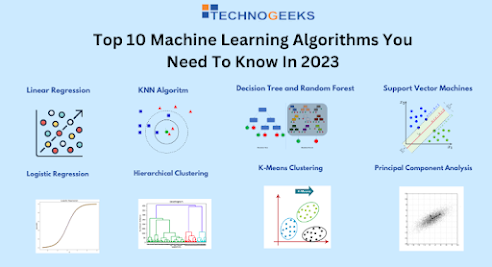
Top 10 Machine Learning Algorithms You Need To Know In 2023


In our rapidly advancing technological world, the definition of manual labor is evolving as nearly all manual tasks are being automated. Machine learning algorithms are a major contributor to this evolution, enabling computers to play chess, perform surgeries, and become more intelligent and personalized.

As computing has progressed over the years, we can anticipate even more advancements in the future. One notable aspect of this technological revolution is the democratization of computing tools and techniques. 

Machine learning algorithms have been developed in response to the need to solve complex, real-world problems. These algorithms are automated and self-modifying, allowing them to continually improve over time. 

Let’s Discuss the top 10 Machine Learning Algorithms 

1. Linear Regression: It is a simple and widely-used algorithm that is used to model the relationship between a dependent variable and one or more independent variables.

2. Logistic Regression: It is a statistical method used to analyze a dataset in which there are one or more independent variables that determine an outcome. It is commonly used for binary classification problems.

3. Decision Tree: It is a simple but powerful machine learning algorithm used for both classification and regression problems. It works by dividing the dataset into smaller and smaller subsets based on the features in the dataset.

4. Random Forest: It is an ensemble learning method that combines multiple decision trees to improve the accuracy and stability of the model.

5. Support Vector Machines (SVM): It is a powerful algorithm that is used for both classification and regression tasks. It works by finding the hyperplane that maximally separates the classes in the dataset.

6. K-Nearest Neighbors (KNN): It is a non-parametric algorithm that is used for classification and regression tasks. It works by finding the k-nearest neighbors to a given data point, and using their labels to predict the label of the data point.

7. Naive Bayes: It is a probabilistic algorithm used for classification tasks. It works by calculating the probability of each class given the data and choosing the class with the highest probability.

8. Gradient Boosting: It is a machine learning technique that builds an ensemble of decision trees and iteratively improves the model by adding new trees that correct the errors of the previous trees.

9. Neural Networks: It is a powerful and flexible machine learning technique inspired by the structure and function of the human brain. It is used for both classification and regression tasks.

10. Convolutional Neural Networks (CNN): It is a specialized type of neural network that is designed to work with image data. It uses convolutional layers to extract features from the images, and pooling layers to reduce the dimensionality of the features.

Future Of Machine Learning


The future of machine learning is promising with continued growth and adoption, advancements in deep learning, increased use of reinforcement learning, the rise of Explainable AI, and the incorporation of ML into edge computing and IoT devices.


Technogeeks is an excellent learning platform for mastering Data Science With Machine Learning.

Enroll to kickstart your journey in Data Science.

Checkout our course on Data Science below

👉 https://technogeekscs.com/courses/data-science-training-classes-institutes-in-pune 👈

Friday, 17 March 2023

How To Become Azure Data Engineer


Who is an Azure Data Engineer?


An Azure Data Engineer is a professional who designs, develops and manages data storage, data processing using Microsoft Azure Technologies. The primary responsibility of an azure data engineer is building and maintaining data pipelines, data warehouses, and data lakes, as well as implementing data security and governance measures. Also, Azure Data Engineer Works With data architects, data scientists, and other members of the data team to build and manage data solutions that enable data-driven decision-making.

Why Choose Azure Data Engineer?

As we all know Azure Data Engineering is one of the most trending and fastest-growing technologies on the market today because of the tremendous growth of Azure Cloud technology.


There are many reasons why companies hire Azure Data Engineers and why someone might choose to pursue a career as an Azure Data Engineer.

  1. High demand: The need for data engineers is increasing rapidly as more organizations want to use their data effectively. According to a report by the US Bureau of Labor Statistics, employment in computer and information technology occupations (which includes data engineering) is projected to grow 11% from 2019 to 2029, much faster than the average for all occupations.
  2. Earning a lucrative salary: According to Glassdoor, the national average salary of azure data engineers in India is around ₹7,62,048.
  3. Azure is a popular cloud platform: Azure is one of the most popular cloud platforms today. As an Azure Data Engineer, you can work on powerful services to help you build scalable and reliable data solutions such as Azure Data Storage, Data Factory, Azure Synapse Analytics, How to Optimize Data Queries in Azure, Azure Databricks, and many more
  4. Exciting and challenging work: As an Azure Data Engineer, you would have the opportunity to work on some of the most exciting and challenging data projects in the industry. Your responsibilities would include designing and implementing data solutions that can help organizations gain valuable insights and drive positive business outcomes. As data is becoming an increasingly important aspect of business operations, the role of a data engineer has become more important than ever. Therefore, your work as an Azure Data Engineer would be highly impactful, as you would play a crucial role in ensuring that organizations are able to leverage their data to make informed decisions and drive growth.
  5. Professional development: The field of data engineering is constantly evolving, with new tools and technologies emerging all the time. As an Azure Data Engineer, you would have the opportunity to continuously learn and grow, staying up to date with the latest trends and technologies in the field.

How to Become an Azure Data Engineer?

Qualification needed for Azure Data Engineering

To become an Azure Data Engineer, there is no specific degree or formal education requirement, but having the following skills and qualifications can be beneficial:

  1. Knowledge of cloud computing and Azure services.

  2. Proficiency in programming languages such as Python and SQL.

  3. Familiarity with Azure data storage and processing services.

  4. Experience with data visualization tools.

  5. Practical experience through projects or internships.

  6. Continual learning and staying up-to-date with the latest trends and technologies.


How long does it take to become a data engineer?

If you have a strong background in programming and data management, you may be able to pick up the skills and knowledge necessary to become an Azure Data Engineer more quickly. 


Technogeeks provides an Azure Data Engineering course for max 2 months with Hands-on projects, certificates, best mentorships, providing career opportunities, and so on.

As more businesses worldwide adopt cloud technologies, there is a growing need for data engineering professionals who can help them build and manage data solutions on the cloud. This creates a global demand for Azure Data Engineers, making it an excellent career choice with promising growth prospects.


Interested In Learning Azure Data Engineer Technogeeks is the best place to learn. Technogeeks’ Azure Data Engineer Certification Course is designed to help IT professionals, beginners and data engineers gain experience in designing, building, and managing data solutions using Microsoft Azure services. With Technogeeks, you can learn from industry experts and gain hands-on experience working with real-time projects.